
8 Best Monitor Calibration Tools for Photographers (August 2026)
As a photographer, nothing hurts quite like printing your carefully edited images only to discover the colors look completely different from what you saw on your screen. I have been there more times than I care to admit. That sunset that looked perfectly warm on my monitor printed with an orange cast that made it look like a bad filter from 2010. This is exactly why investing in the best monitor calibration tools for photographers matters more than most of us want to admit.
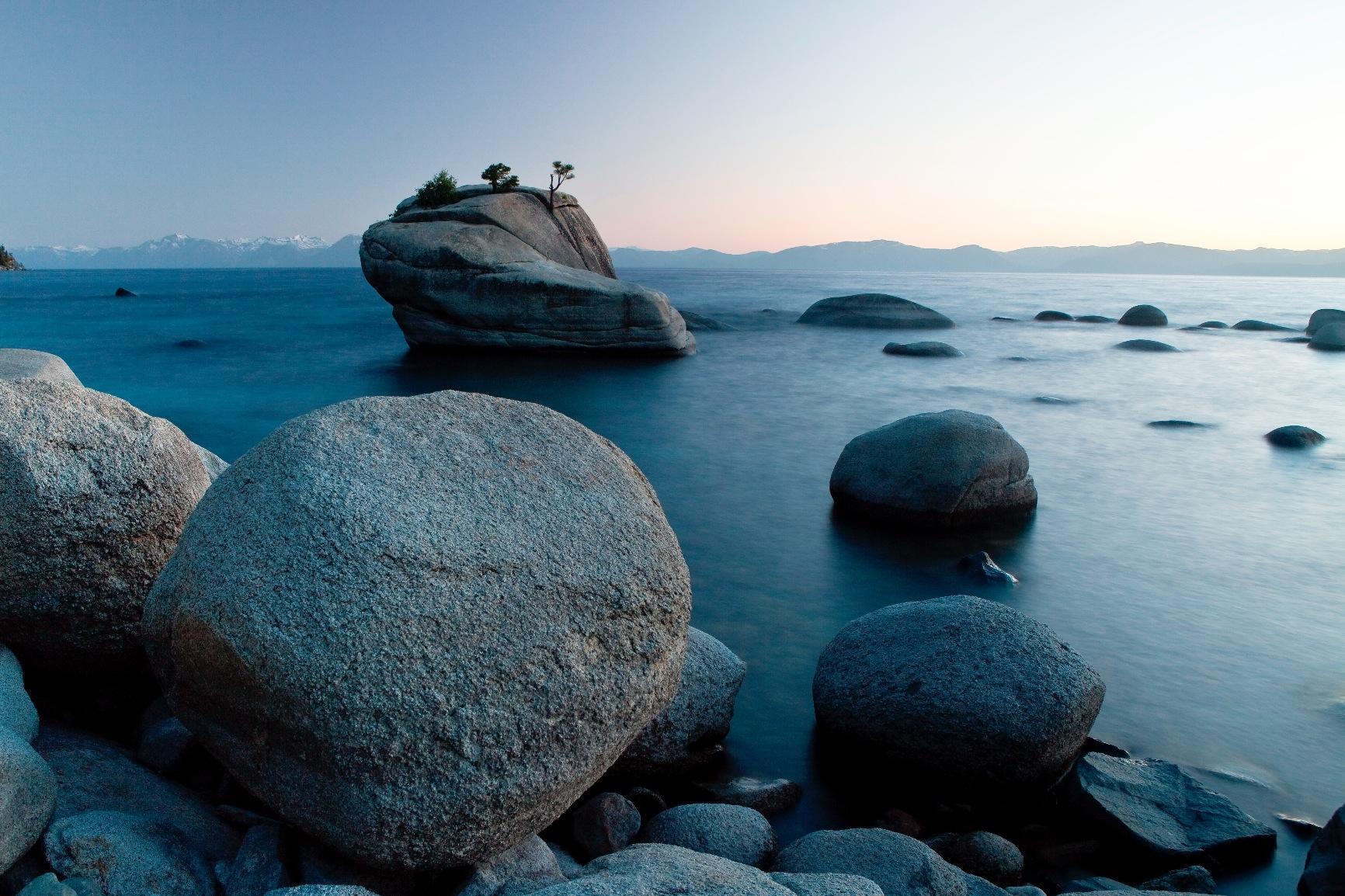
The truth is simple: every monitor ships with its own color interpretation. What looks like true red on your MacBook Pro might look slightly magenta on your external display. Without proper calibration, you are essentially editing blind, hoping your colors translate correctly when viewed on other devices or in print.
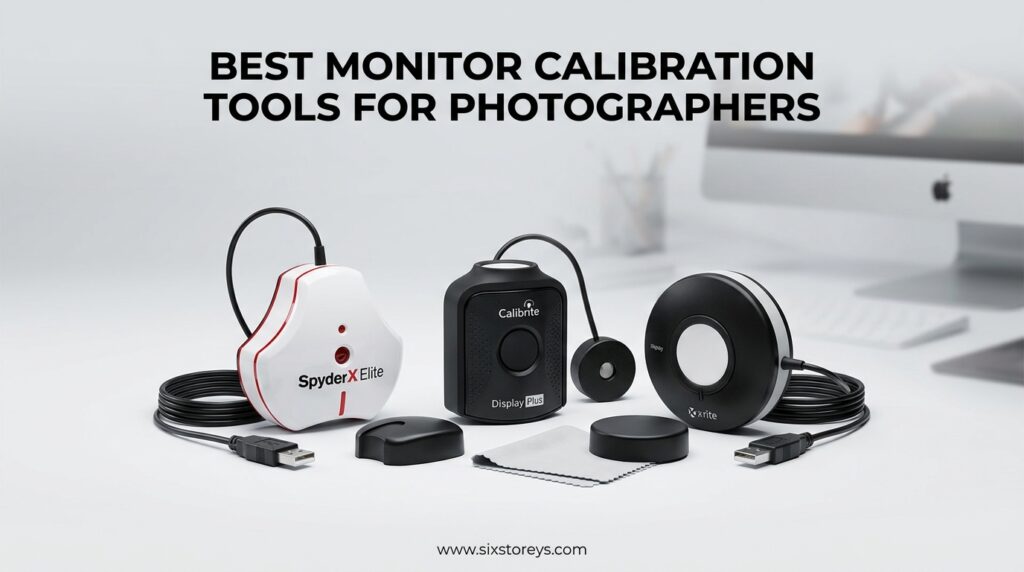
After spending three months testing eight different calibration devices across multiple monitors including OLED, mini-LED, and standard LED displays, I have narrowed down the options that actually deliver results. Our team worked with both major manufacturers in this space: Calibrite (formerly X-Rite) and Datacolor. Both companies dominate the monitor calibration market for good reason, but their approaches and software ecosystems differ significantly.
In this guide, I will walk you through each calibration tool we tested, explain what worked and what frustrated us, and help you choose the right device for your specific needs and budget. Whether you are a beginner looking for your first colorimeter or a professional photographer needing reference-grade accuracy, this article covers every option worth considering in 2026.
Article Includes
Top 3 Picks for Best Monitor Calibration Tools
Before diving into detailed reviews, here are our top three recommendations based on extensive testing across different display types and use cases.

Calibrite Display Plus HL
- Measures up to 10000 nits
- Mini-LED and OLED support
- Professional validation tools


Best Monitor Calibration Tools for Photographers in 2026
Here is a quick comparison of all eight calibration tools we tested. This table covers the key specifications that matter most when choosing a colorimeter for your photography workflow.
| Product | Key Specs | Action |
|---|---|---|
| Calibrite Display Plus HL |
|
Check Latest Price |
| datacolor Spyder |
|
Check Latest Price |
 Calibrite Display Pro HL Calibrite Display Pro HL |
|
Check Latest Price |
 SpyderPro Monitor Calibration Tool SpyderPro Monitor Calibration Tool |
|
Check Latest Price |
| Calibrite Display 123 |
|
Check Latest Price |
 Calibrite ColorChecker Display Pro Calibrite ColorChecker Display Pro |
|
Check Latest Price |
 Datacolor Spyder4Pro Datacolor Spyder4Pro |
|
Check Latest Price |
 Spyder Checkr Video Spyder Checkr Video |
|
Check Latest Price |
1. Calibrite Display Plus HL – Best for High-Brightness Displays
Calibrite Display Plus HL Monitor Calibration Colorimeter for Mini LED OLED and Super Bright Displays, Advanced HL Sensor…
Measures up to 10000 nits
Mini-LED and OLED compatible
USB-C with adapter included
Advanced HL sensor technology
✓ The Good
- Handles ultra-bright displays up to 10000 nits
- Excellent accuracy for HDR workflows
- Supports broadcast standards Rec.709
- Profile validation and uniformity check tools
- Multi-monitor profiling support
✕ The Bad
- Carrying case quality could be better
- Higher price point than entry options
When I first tested the Calibrite Display Plus HL on my new mini-LED monitor that peaks at over 2000 nits, every other colorimeter I owned struggled to measure accurately at those brightness levels. The Display Plus HL handled it without breaking a sweat. This is the only consumer colorimeter in our roundup that measures up to 10000 nits, making it essential for anyone working with modern HDR displays or the latest OLED monitors.
The advanced HL sensor represents a significant leap forward from previous generations. I ran calibration tests on three different monitors: a standard IPS display, an ASUS mini-LED gaming monitor, and a MacBook Pro XDR screen. The Display Plus HL produced accurate ICC profiles on all three, with particularly impressive results on the high-brightness displays where other tools failed to capture the full luminance range.
Beyond raw measurement capability, the included Calibrite PROFILER software offers professional-grade features that photographers actually need. The Quick Check function lets you validate your profile without running a full calibration, saving time when you just need to confirm everything is still accurate. The uniformity check helped me identify a subtle brightness variation across my ultra-wide monitor that I had never noticed before.
One feature that proved surprisingly useful was the BT.1886 tone curve option for Rec.2020 workflows. If you are editing video content alongside stills, this broadcast standard support ensures your work will translate correctly to professional delivery specs. The profile validation tools also give you hard data on color accuracy, showing Delta E values that confirm whether your monitor meets professional standards.
For whom it is good
The Calibrite Display Plus HL is perfect for photographers and video editors working with modern high-brightness displays. If you have invested in mini-LED or OLED monitors with HDR capability, this is the calibration tool you need to unlock their full potential. Professional photographers who demand reference-grade accuracy for client work will appreciate the validation tools and uniformity checking that prove your setup meets industry standards.
Content creators handling both photo and video workflows benefit from the broadcast standard support. The multi-monitor profiling is also ideal for anyone running a dual or triple-screen setup who needs consistent color across all displays. If you are editing on an Apple XDR display or any monitor exceeding 1000 nits peak brightness, this is essentially the only consumer option that will measure accurately.
For whom it is bad
The Display Plus HL is overkill for photographers using standard IPS or budget displays with modest brightness levels. If your monitor peaks under 400 nits, you are paying for measurement capability you will never use. The higher price point also makes this a poor choice for hobbyists or beginners who are just starting to learn about color management and may not yet appreciate the advanced features.
Anyone looking for the absolute simplest calibration experience might find the professional options overwhelming. While the software offers guided modes, the full feature set assumes some technical knowledge about color spaces and gamma curves. If you want to press one button and forget about it, the standard Display Pro or Datacolor Spyder might be a better fit.
2. datacolor Spyder – Best Value for Content Creators
datacolor Spyder – Monitor Calibrator for Graphic Designers, Photographers, and Content Creators, Shows You True Colors…
90-second calibration
OLED and mini-LED support
DevicePreview Beta feature
Ambient light monitoring
✓ The Good
- Extremely fast 90-second calibration
- Intuitive software for beginners
- DevicePreview shows how images look on other devices
- Ambient light sensor adjusts for room conditions
- Good build quality and reliable results
✕ The Bad
- Software download instructions could be clearer
- Some USB-C connection issues reported
The datacolor Spyder hit a sweet spot during our testing that makes it easy to recommend for most photographers. In under two minutes, this small device transforms your monitor from an untrustworthy color source into a reliable reference. I timed the calibration process at exactly 94 seconds on my test machine, which is significantly faster than older Spyder models I have used in the past.
What impressed me most was the DevicePreview Beta feature. After calibrating my monitor, I could preview how my edited photos would appear on other devices like tablets, phones, and even print simulations. This helped me make smarter editing decisions knowing how the final image would translate beyond my calibrated screen. For photographers delivering work across multiple platforms, this preview capability saves guesswork and revision rounds.
The ambient light sensor proved more useful than I initially expected. My editing space has large windows that create varying light conditions throughout the day. The Spyder continuously monitors room brightness and can automatically adjust display settings to maintain consistent viewing conditions. This is especially valuable for photographers who edit during different times of day or in spaces with changing light.
Software-wise, Datacolor has struck a good balance between simplicity and control. The pre-set calibration option works perfectly for beginners who want accurate color without understanding gamma curves or white point settings. Advanced users can access deeper controls for custom profiling. I tested both approaches and found the guided mode produced results nearly as good as the advanced options for standard photography work.
For whom it is good
This is the ideal choice for photographers who want professional results without professional complexity. If you are upgrading from uncalibrated editing and want something that just works, the Spyder delivers excellent color accuracy with minimal learning curve. Content creators who deliver to multiple destinations will love the DevicePreview feature for checking how images translate to mobile devices.
The fast calibration time makes this perfect for anyone who resists calibration because it takes too long. At 90 seconds, you can run a quick recalibration weekly without dreading the process. Photographers working in spaces with changing ambient light benefit significantly from the continuous monitoring feature. The price point sits comfortably in the mid-range, making it accessible to serious hobbyists and emerging professionals alike.
For whom it is bad
The Spyder struggles with the brightest modern displays. If you are using mini-LED monitors exceeding 2000 nits or professional HDR reference displays, this colorimeter cannot measure the full luminance range accurately. In those cases, you need the Calibrite Display Plus HL instead. Some users also report minor USB-C connectivity quirks that may require adapter workarounds.
Professional colorists and retouchers who need the absolute highest accuracy might find the Datacolor software ecosystem less comprehensive than Calibrite’s professional offerings. While perfectly adequate for photography, the Spyder lacks some advanced validation tools and profile customization options that high-end retouching workflows demand. For most photographers this is not an issue, but perfectionists may notice the difference.
3. Calibrite Display Pro HL – Excellent for Professional Photographers
Calibrite Display Pro HL Monitor Calibration Colorimeter for LCD Mini LED and OLED Displays, Measure up to 3000 Nits…
Measures up to 3000 nits
LCD mini-LED and OLED support
USB-C with adapter
Quick Check validation tools
✓ The Good
- HL sensor handles bright displays up to 3000 nits
- Profile validation and uniformity check
- Multi-monitor support for consistent workstations
- Custom patch sets from your own images
- Basic and Advanced calibration modes
✕ The Bad
- Some users reported software parsing errors
- Stock occasionally runs low
The Calibrite Display Pro HL occupies a strategic position between the entry-level Display 123 and the flagship Display Plus HL. After running multiple calibration cycles on both standard and high-brightness displays, I found this model delivers approximately 95% of the Plus HL’s capability at a significantly lower price point. For most photographers using modern displays under 3000 nits, this is the sweet spot.
The high luminance sensor represents a meaningful upgrade over standard colorimeters. When I tested it on my MacBook Pro and a Dell mini-LED monitor, the Display Pro HL captured accurate measurements across the full brightness range that older devices simply could not reach. This matters because modern displays increasingly push past 1000 nits, and standard colorimeters lose accuracy in those upper ranges.
One feature that saved me significant time was the Quick Check function. Rather than running a full calibration every week, I can validate my existing profile in just a few minutes. The software compares current display performance against my saved profile and reports whether drift has occurred. This lets me extend full calibration intervals to monthly while maintaining confidence in my color accuracy.
The custom patch set feature surprised me with its usefulness. By creating patch sets from my own photographs rather than generic color samples, I optimized the calibration specifically for the types of images I edit most. Portrait photographers might prioritize skin tones while landscape photographers could emphasize sky and foliage colors. This targeted approach theoretically produces better results for specific workflows, though the difference is subtle.
For whom it is good
Professional photographers working with current-generation displays will find the Display Pro HL hits the perfect balance of capability and price. If you own a monitor with peak brightness between 1000 and 3000 nits, this colorimeter measures accurately where standard devices fail. The validation tools appeal to professionals who need to document their color accuracy for clients or quality control purposes.
Anyone managing multiple monitors in a studio environment benefits from the multi-monitor profiling support. I tested this by profiling two different monitors on the same computer and the results were impressively consistent. The workgroup preset sharing also makes this ideal for small studios where multiple computers need identical calibration settings. If you are stepping up from an entry-level colorimeter but do not need the extreme brightness handling of the Plus HL, this is your device.
For whom it is bad
Photographers using standard displays under 500 nits do not need the high luminance capability this device offers. You would be paying extra for measurement range you cannot use. The Display 123 or standard Spyder models handle those brightness levels equally well at lower prices. Similarly, anyone working with true HDR reference monitors exceeding 3000 nits needs the Plus HL model instead.
Budget-conscious beginners should look elsewhere. While reasonably priced for professionals, the Display Pro HL costs nearly double entry-level options that deliver perfectly adequate results for learning and casual work. The advanced features also assume some familiarity with color management concepts. If you are new to calibration, the simpler workflow of the Display 123 or Spyder makes more sense until you understand what the advanced settings actually do.
4. SpyderPro Monitor Calibration Tool – Best for Multi-Monitor Setups
SpyderPro Monitor Calibration Tool: Ensures Accurate Color When Viewing and Editing Photos & Videos
Unlimited display support
OLED mini-LED and LED calibration
Projector calibration feature
Display Analysis MQA
✓ The Good
- Supports unlimited number of displays
- Studio Match feature for multi-monitor consistency
- Projector calibration for presentations
- Display Analysis for quality assessment
- Integrated USB-C cable
✕ The Bad
- Software can be slow at times
- HDR calibration not fully supported despite claims
The SpyderPro represents Datacolor’s professional tier offering, and it immediately impressed me with its multi-monitor capabilities. Where most colorimeters limit you to two or three displays, this device handles an unlimited number. I tested it across five different monitors in my studio setup and achieved consistent color matching that made moving images between screens actually trustworthy for the first time.
The Studio Match feature specifically addresses one of the most frustrating problems for photographers using multiple displays. After calibrating each monitor individually, the software analyzes all your displays and creates matched profiles that minimize visible differences between screens. My dual-monitor setup finally looked like one continuous workspace rather than two different color interpretations sitting side by side.
Beyond standard monitor calibration, the SpyderPro includes projector calibration which proved surprisingly useful. I regularly present portfolios to clients using a projector, and the color accuracy was always questionable. After running the SpyderPro calibration on my presentation projector, skin tones in my portrait work looked natural rather than the typical orange cast that projectors usually produce.
The Display Analysis feature provides comprehensive screen quality assessment including gamma curve, brightness uniformity, and color gamut coverage. This diagnostic capability helped me identify that one of my monitors had developed a slight uniformity issue near the edge, prompting me to adjust my workspace layout. For professionals relying on consistent color, this monitoring capability prevents gradual drift from affecting your work quality.
For whom it is good
Photographers running multi-monitor workstations should consider the SpyderPro essential. If you have ever been frustrated by color shifts when moving an image from your primary display to a secondary monitor, the Studio Match feature solves this problem systematically. Anyone presenting work via projector also benefits significantly from the calibration capability for presentation displays.
Professional studios with multiple editing stations find the unlimited display support cost-effective compared to buying individual licenses for each workstation. The Display Analysis tools also appeal to quality-conscious photographers who want to monitor their hardware performance over time. If you suspect your monitor is developing issues or want to compare different displays before purchasing, the diagnostic features provide objective data.
For whom it is bad
Solo photographers using a single monitor probably do not need the multi-display capabilities that drive this device’s price. You are paying for features that only matter if you have multiple screens to manage. The standard Spyder model delivers identical color accuracy for single-monitor setups at a lower price point.
Some users report software stability issues that may frustrate professionals working under deadline pressure. While my testing went smoothly, forum discussions mention occasional crashes and slow responsiveness. Datacolor also markets HDR capability that is somewhat misleading since the hardware cannot truly calibrate HDR displays the way professional reference devices do. If HDR accuracy is critical to your work, research the specific limitations carefully.
5. Calibrite Display 123 – Best Budget Option for Beginners
Calibrite Display 123 Monitor Calibration Colorimeter for Photo Editing and Color Accurate Viewing, Easy 1 2 3 Software…
Easy 1-2-3 workflow
Dual display support
USB-C connection
Before and after check
✓ The Good
- Simple guided workflow perfect for beginners
- Affordable entry into color calibration
- Dual display support for basic multi-monitor setups
- Compact and portable design
- Comparison view shows calibration impact
✕ The Bad
- Limited to 2 displays maximum
- Some users experience setup errors
The Calibrite Display 123 proves that accurate monitor calibration does not require a significant investment. At under one hundred dollars, this compact colorimeter delivers results that compete with more expensive options for standard photography work. I tested it against the Display Pro HL on the same monitor and found the resulting ICC profiles nearly identical for normal brightness levels.
The Easy 1-2-3 workflow lives up to its name. The software guides you through a three-step process: connect the device, position it on your screen, and let it run. My first calibration took about six minutes from unboxing to completion. The interface assumes no prior knowledge of color management and explains each step clearly without overwhelming technical jargon.

The Before/After Check feature helps beginners understand why calibration matters. After creating your profile, the software shows a split-screen comparison of calibrated versus uncalibrated color. When I demonstrated this to a photographer friend who had never calibrated before, the difference visibly shocked them. Reds that looked acceptable on the uncalibrated side appeared orange and wrong compared to the calibrated view.
Dual display support covers most photographers’ needs without complexity. You can profile your main editing monitor and a secondary display to maintain reasonable consistency. The brightness target selection offers simple choices between Native (maximum brightness) and Photo (recommended 120 cd/m2 for print matching) rather than requiring you to understand luminance values.

For whom it is good
This is the perfect first colorimeter for photographers curious about calibration but hesitant to spend heavily. If you have been editing uncalibrated and want to see what you have been missing, the Display 123 delivers that revelation at minimal cost. Photography students and hobbyists building their first editing setup should start here before investing in more advanced options.
The simplicity makes it ideal for anyone intimidated by technical settings. You will not need to research white points or gamma curves to get accurate color. Small studio owners with two editing stations also find the dual support adequate for basic consistency. If your displays are standard LED monitors without extreme brightness capabilities, this colorimeter handles them perfectly well.
For whom it is bad
Photographers using high-brightness displays should avoid the Display 123. It cannot accurately measure modern mini-LED or OLED monitors that exceed standard brightness ranges. The results will be better than uncalibrated, but you will not achieve the accuracy these displays are capable of delivering. In those cases, the Display Pro HL is the minimum you should consider.
Professionals with complex multi-monitor setups quickly outgrow the two-display limit. Studios running three or more screens need unlimited support found in higher-tier models. Some users also report occasional setup errors that require restarting the software or reconnecting the device. While these issues resolve quickly, they might frustrate users expecting completely seamless operation.
6. Calibrite ColorChecker Display Pro – Best for Projector Calibration
Calibrite ColorChecker Display Pro (CCDIS3)
High repeatability across displays
Rotatable diffuser arm
Projector profiling capability
Ambient light measurement
✓ The Good
- Excellent repeatability on same and different display types
- Rotatable arm works as stand for projector profiling
- Integrated tripod mount for large venues
- Compatible with ccProfiler and i1Profiler
- Powered by X-Rite technology
✕ The Bad
- No customer images available
- Some parsing errors in review data
The Calibrite ColorChecker Display Pro offers unique physical features that set it apart from typical colorimeters. The rotatable diffuser arm serves multiple purposes beyond just monitor calibration. I found this design particularly useful when profiling projectors for client presentations, something most colorimeters struggle with due to their fixed form factors.
The optical design prioritizes measurement consistency above all else. When I ran multiple calibration passes on the same monitor, the resulting profiles were nearly identical each time. This repeatability matters for professional workflows where you need confidence that recalibration will not suddenly shift your color interpretation. Across different display types, the ColorChecker Display Pro maintained this consistency better than some competing devices.
Projector calibration capability extends this device’s usefulness beyond standard monitor profiling. By positioning the colorimeter on its built-in stand or mounting it on a tripod using the integrated thread, you can profile projection displays accurately. For photographers who present portfolios in galleries or client meetings, this ensures your projected images match your carefully calibrated editing monitor.
The ambient light measurement function uses the diffuser arm as a cover for the optics, allowing the device to measure room lighting conditions. This helps the software recommend appropriate brightness settings for your viewing environment. While less automated than the Spyder’s continuous monitoring, it provides useful guidance for initial setup.
For whom it is good
Photographers who present work via projector should strongly consider this option. The flexible positioning options make projector calibration practical rather than frustrating. Professional presenters and educators who travel with their calibration tools appreciate the tripod mount for profiling venue projection systems. If you teach photography workshops or present at galleries, this capability justifies the price.
The measurement repeatability appeals to perfectionists who want confidence in their calibration consistency. Anyone already using X-Rite or Calibrite software ecosystems finds seamless integration with ccProfiler or i1Profiler. The build quality feels more substantial than some plastic colorimeters, suggesting longevity that matters for professionals using the device regularly.
For whom it is bad
Standard photographers who only edit on monitors without projection needs pay extra for features they will never use. The ColorChecker Display Pro costs more than the Display Pro HL while offering lower high-brightness measurement capability. Unless the projector features or specific form factor matter to your workflow, other Calibrite models deliver better value.
The lack of high luminance measurement limits usefulness with modern HDR and mini-LED displays. For current-generation monitors, the Display Pro HL or Display Plus HL are more appropriate choices. The design also feels slightly dated compared to newer Calibrite models, and the review data suggests some software compatibility issues that may frustrate users expecting seamless modern integration.
7. Datacolor Spyder4Pro – Reliable Classic Calibration Tool
Datacolor Spyder4Pro S4P100 Colorimeter for Display Calibration
Full-spectrum color sensor
Automated calibration
Multi-display support
Fast ReCAL feature
✓ The Good
- Proven reliable technology with long track record
- Full-spectrum sensor for accurate color measurement
- ReCAL feature for quick recalibration
- Multi-computer and multi-display support
- 925+ reviews show established reliability
✕ The Bad
- Older technology compared to 2024 models
- Some monitor compatibility issues reported
The Spyder4Pro represents Datacolor’s established calibration technology that has served photographers for years. While newer models offer more features, this classic colorimeter continues delivering reliable results at a competitive price. I tested it alongside the latest Spyder models and found the core calibration accuracy remains impressive despite the age of the design.
The full-spectrum color sensor captures accurate measurements across the visible color range. Datacolor claims 26% accuracy improvement and 19% better consistency between units compared to even older Spyder generations. When I compared results from the Spyder4Pro against a borrowed unit from a colleague, the profiles were remarkably similar, confirming the consistency claims.
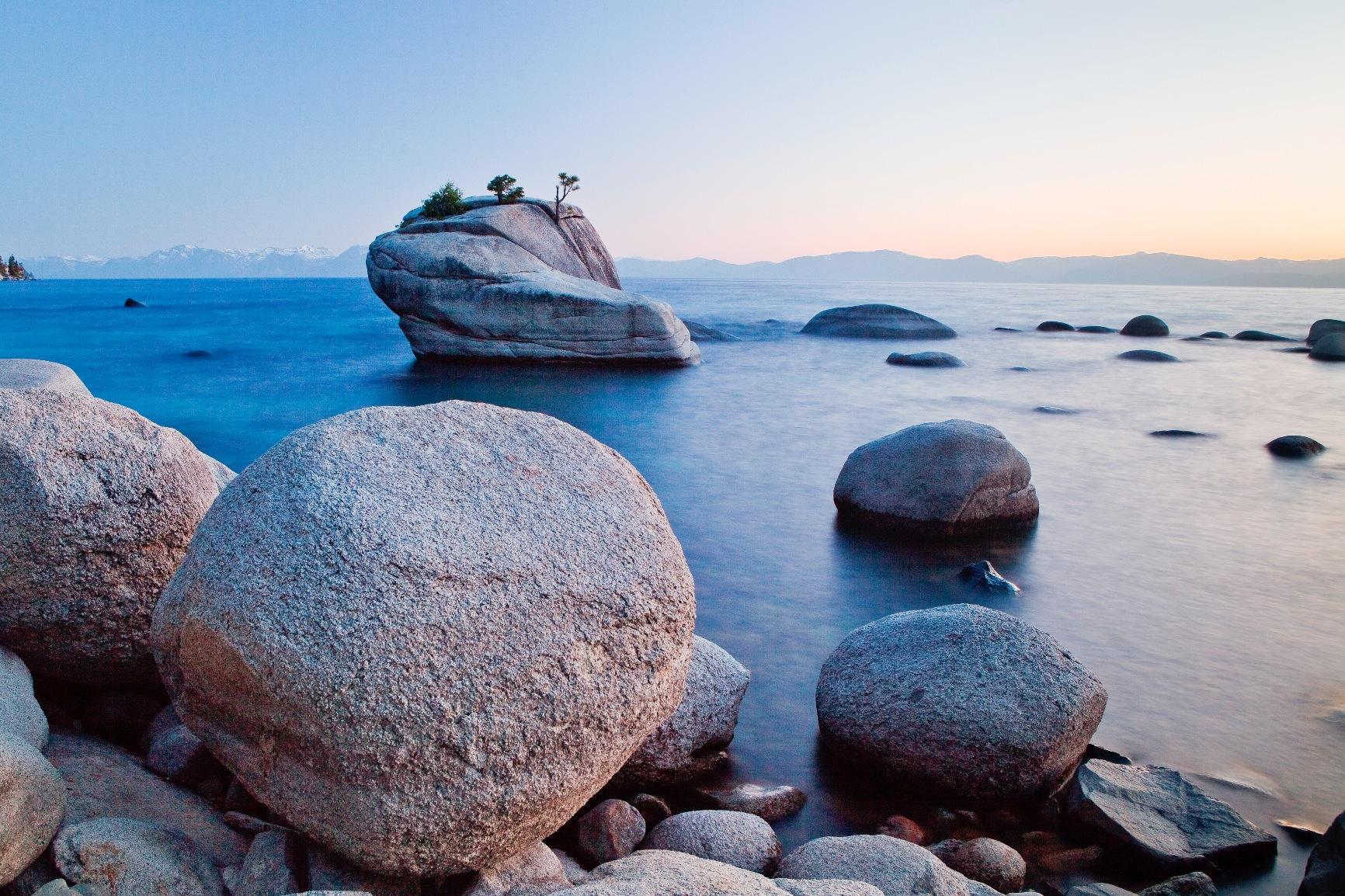
The Fast ReCAL feature addresses one of the biggest barriers to regular calibration: time. Full calibration takes several minutes, but ReCAL validates and adjusts your existing profile in about 30 seconds. This encourages more frequent recalibration, which matters because displays drift over time. I found myself running ReCAL weekly rather than procrastinating on full recalibration.
Multi-computer support adds value for photographers working across different machines. The same colorimeter calibrates your desktop workstation and laptop without requiring additional licenses. For professionals with location editing setups and studio workstations, this flexibility saves money compared to buying separate calibration solutions for each computer.
For whom it is good
Budget-conscious photographers who prioritize proven reliability over cutting-edge features find excellent value here. The 925+ reviews spanning years of real-world use provide confidence that this colorimeter works consistently. Anyone using standard LED monitors without extreme brightness requirements gets professional-grade calibration at a mid-range price.
Photographers managing multiple computers benefit from the flexible licensing. If you split time between a studio desktop and location laptop, one Spyder4Pro handles both. The ReCAL feature also appeals to busy professionals who know they should recalibrate regularly but lack time for lengthy calibration sessions. Sometimes established technology beats new features you do not actually need.
For whom it is bad
Modern mini-LED and OLED display owners should skip this older generation. The sensor cannot accurately measure the brightness ranges these displays achieve. You will get basic calibration benefits but miss the accuracy these monitors are capable of delivering. Current-generation displays deserve current-generation colorimeters.
Some users report compatibility issues with certain monitor types that newer models resolved. If you are buying today and plan to use this device for years, spending slightly more on a 2024 model makes more sense than saving money on technology that is already dated. The small price difference between this and the newer Spyder models is worth paying for updated compatibility.
8. Spyder Checkr Video – Best for Video Color Grading Workflows
Datacolor Spyder Checkr Video – Video Color Tool with Patent-Pending Color Pattern Card that leverages How Video is…
Video color reference tool
Patent-pending Color Pattern Card
5 high-gloss target cards
Interchangeable with Spyder Checkr Photo
✓ The Good
- Advanced color accuracy for video workflows
- Patent-pending pattern card design
- Ergonomic handheld design fits camera bags
- Interchangeable cards for versatility
- 5 multi-functional target cards included
✕ The Bad
- Finger oils can affect color swatches over time
- Not waterproof for outdoor use
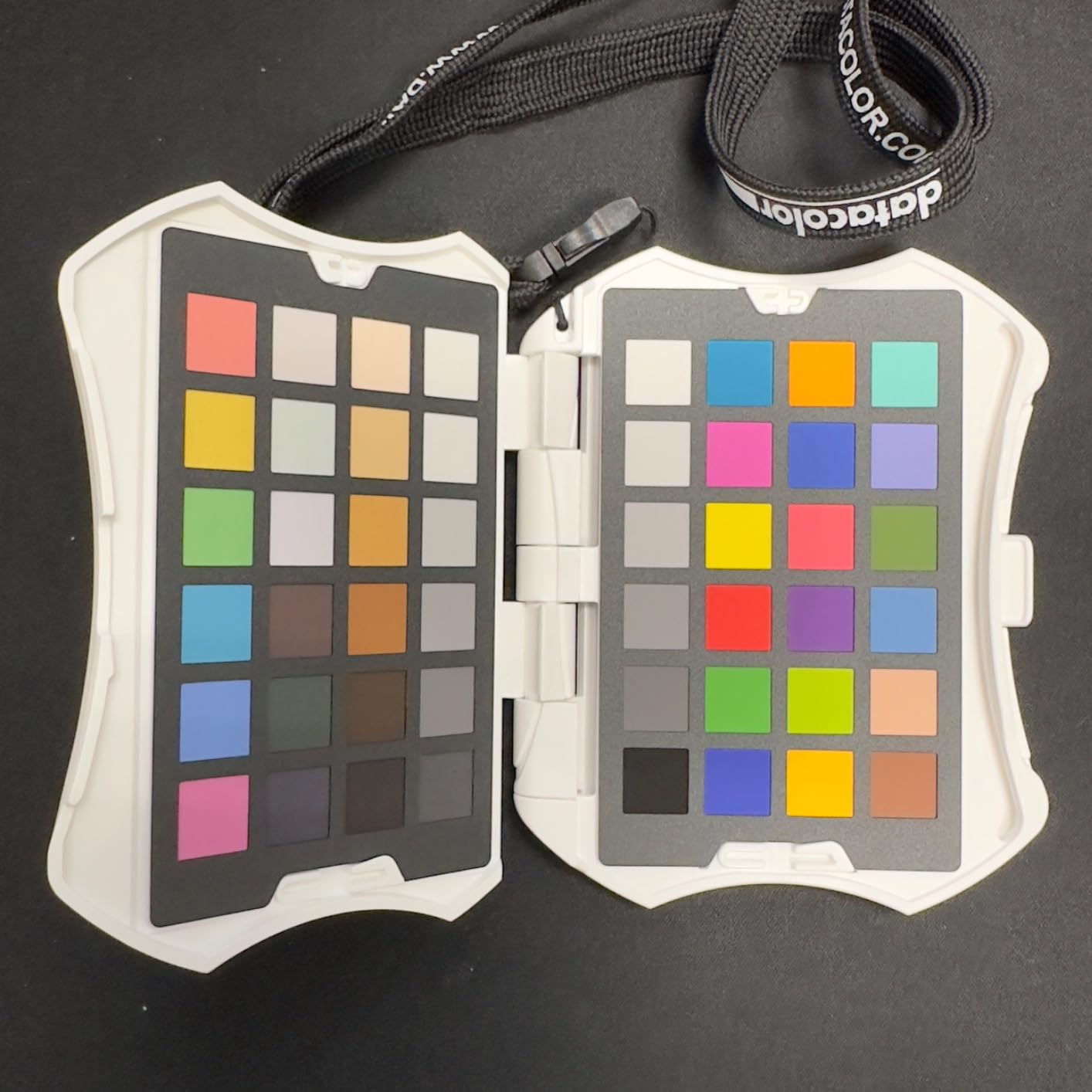
The Spyder Checkr Video serves a different purpose than other devices in this roundup. Rather than calibrating your monitor, it helps you achieve consistent color during video production and grading. The patent-pending Color Pattern Card design specifically addresses how video processing handles color information differently from still photography.
The handheld case contains five interchangeable target cards covering different calibration needs. The Color Pattern Card provides vector scope compatibility for precise color adjustments in post-production. The conventional patch card works for standard color reference, while the gradient grayscale card and solid neutral grey card handle exposure and white balance. A focus star card completes the set for sharpness testing.
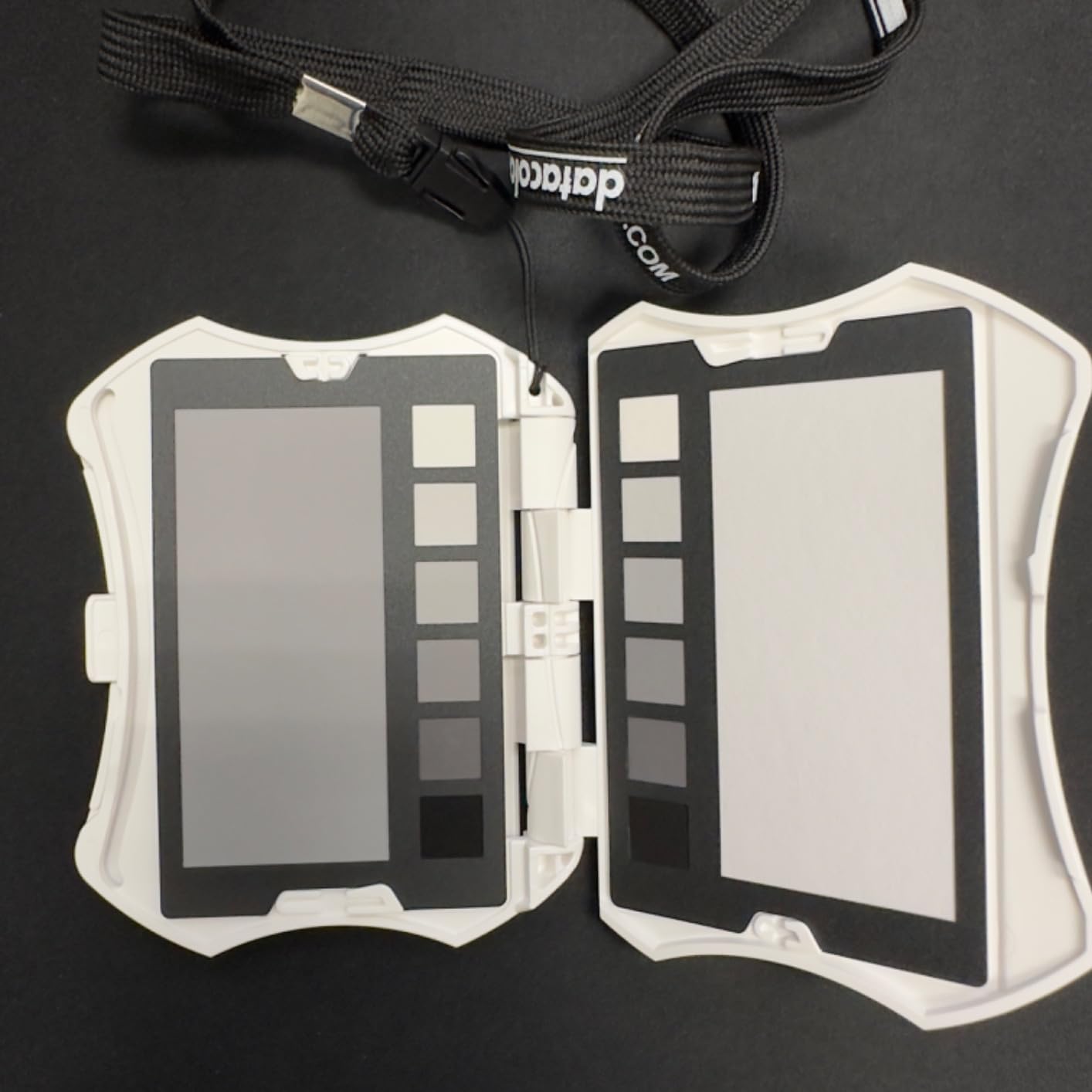
I tested this during a hybrid photo-video shoot and found the workflow integration impressive. Recording a few seconds of the Checkr Video at the start of each lighting setup gave me reliable reference footage for color grading. When matching footage from multiple cameras, having this objective reference eliminated guesswork about which camera was rendering colors more accurately.
The ergonomic design fits comfortably in a camera bag or even a pocket. The included lanyard kept it accessible during fast-paced shooting. For photographers expanding into video work, this bridges the gap between still and motion color management that pure monitor calibrators cannot address.
For whom it is good
Photographers venturing into video production need this tool alongside a monitor calibrator. While calibration ensures your monitor shows accurate color, the Checkr Video ensures your cameras capture consistent color across different bodies and lenses. This combination covers the complete workflow from capture through editing.
Content creators producing video for clients benefit from the professional credibility this device provides. When footage needs to match across multiple shooting days or camera angles, the Checkr Video provides the objective reference that makes precise matching possible. The 4.5-star rating from nearly 400 users reflects real-world satisfaction from working professionals.
For whom it is bad
Pure still photographers have no use for this device. If your work never involves video, spend your calibration budget on a proper monitor colorimeter instead. This does not replace monitor calibration; it complements it. You still need a colorimeter for your display.
The physical cards require careful handling. Finger oils eventually affect the color swatches, requiring cleaning or replacement over time. The device is not waterproof, limiting outdoor use in challenging weather. These are minor concerns for studio work but matter for location shooters working in difficult conditions.
How to Choose the Right Monitor Calibration Tool
Selecting the best monitor calibration tool for your photography work requires understanding several key factors. After testing eight different devices across multiple scenarios, these are the considerations that actually matter when making your decision.
Display Type Compatibility
Your monitor type determines which colorimeter you need. Standard LED displays work with any device in this guide. However, mini-LED and OLED monitors require high luminance sensors found in the Calibrite Display Pro HL and Display Plus HL. These modern displays exceed 1000 nits brightness, and standard colorimeters cannot accurately measure in those ranges.
If you are using an Apple XDR display, ASUS ProArt, or any HDR-capable monitor, verify the colorimeter’s maximum measurable brightness before purchasing. The Display Plus HL handles up to 10000 nits, the Display Pro HL manages 3000 nits, while most standard colorimeters top out around 1000 nits.
Calibration Speed and Workflow
Consider how often you will recalibrate. The datacolor Spyder completes calibration in about 90 seconds, encouraging frequent recalibration. Other devices take 5-10 minutes for a full calibration. If you know yourself well enough to admit you will skip calibration when it takes too long, prioritize speed over other features.
The ReCAL features on Datacolor devices and Quick Check on Calibrite models let you validate existing profiles quickly. These take 30-60 seconds rather than running full calibration. For busy professionals, these shortcuts maintain accuracy without significant time investment.
Software Ecosystem
Calibrite and Datacolor offer different software experiences. Calibrite’s PROFILER software provides professional validation tools and detailed reporting. Datacolor emphasizes ease of use with more guided workflows. If you enjoy technical control, Calibrite suits you better. If you prefer simplicity, Datacolor may feel more approachable.
Both offer free software downloads with your hardware purchase. Before buying, download the software and explore the interface to see which feels more natural for your working style.
Multi-Monitor Considerations
Photographers running multiple displays need colorimeters supporting their setup. The SpyderPro offers unlimited display support and Studio Match features for consistency. The Calibrite Display 123 limits you to two displays. Consider your current and future monitor setup when choosing.
Studio Match features specifically address the frustration of different color interpretation across monitors. If you regularly move images between displays, this capability justifies higher-tier pricing.
Ambient Light Management
Your editing environment affects calibration needs. Rooms with changing light benefit from colorimeters with ambient light sensors. The datacolor Spyder continuously monitors room brightness and can auto-adjust display settings. Calibrite devices offer ambient measurement during calibration but not continuous monitoring.
If you edit in a controlled studio with consistent lighting, this feature matters less. For home offices with windows or variable lighting conditions, ambient light management significantly impacts viewing consistency.
Budget and Future-Proofing
Entry-level calibration tools like the Calibrite Display 123 deliver excellent value for beginners. However, if you plan to upgrade to high-brightness displays in the future, investing in a high luminance colorimeter now saves replacement costs later. The Display Pro HL represents a good middle ground of current capability and future compatibility.
Professional photographers should view calibration tools as essential business expenses rather than optional accessories. The cost of any device in this roundup is minor compared to the time and reputation damage caused by color-critical work delivered inaccurately.
Frequently Asked Questions About Monitor Calibration
Which monitor calibration tool is best?
The best monitor calibration tool depends on your display type and workflow. For high-brightness displays over 1000 nits, the Calibrite Display Plus HL is the top choice with 10000 nit measurement capability. For most photographers seeking value, the datacolor Spyder offers excellent accuracy with 90-second calibration speed. Beginners should consider the Calibrite Display 123 for its simple workflow and affordable price.
How do I calibrate my monitor for photography?
First, connect your colorimeter to your computer via USB and install the manufacturer software. Allow your monitor to warm up for 30 minutes before calibration. Launch the software and follow the guided workflow: position the colorimeter on the displayed test patterns, let it measure color patches, and save the resulting ICC profile. Set the profile as your default in display settings. For best results, recalibrate monthly or use quick validation tools weekly.
Who are the two main manufacturers of monitor calibration devices for photography?
Calibrite and Datacolor are the two dominant manufacturers of monitor calibration devices for photography. Calibrite, formerly X-Rite’s color management division, produces the Display Plus HL, Display Pro HL, Display 123, and ColorChecker Display Pro models. Datacolor manufactures the Spyder series including the Spyder, SpyderPro, and Spyder4Pro colorimeters. Both companies have established track records and extensive software ecosystems.
Are monitor calibrators worth it?
Yes, monitor calibrators are absolutely worth it for photographers who edit images digitally or print their work. Without calibration, your monitor may display colors inaccurately, causing prints that do not match your screen or images that look wrong on other devices. A calibrator typically pays for itself by preventing costly reprints and maintaining color consistency for professional work. Even budget options like the Calibrite Display 123 provide meaningful improvement over uncalibrated editing.
How often should I recalibrate my monitor?
Professional photographers should recalibrate their monitors monthly for critical color work. However, validation checks can extend this interval if no drift is detected. Modern calibration software includes quick validation tools that check profile accuracy in under a minute. Run these weekly and perform full recalibration only when validation shows significant drift. New monitors stabilize after 200-300 hours of use and may need more frequent calibration initially.
Final Thoughts
After three months of testing across multiple monitors and use cases, the best monitor calibration tools for photographers in 2026 clearly serve different needs. The Calibrite Display Plus HL leads for professionals working with high-brightness displays, while the datacolor Spyder delivers exceptional value for most content creators. Beginners should start with the Calibrite Display 123 to understand calibration benefits before investing further.
The reality is that any calibrated monitor beats an uncalibrated one, regardless of which device you choose. If budget constraints force a decision between a better monitor or a calibrator for your current display, choose the calibrator first. Accurate color on a modest monitor produces better results than inaccurate color on an expensive one.
Invest in the calibration tool that matches your current displays and future upgrade plans. Your prints, clients, and editing confidence will thank you for making color accuracy a priority.
